
AppBlock - Block Apps & Sites
MobileSoft s.r.o.Productivity
4.74.42K Reviews
- Version
- 7.19.3
- Installs
- 10.00M
- Age Rating
- Everyone
Screenshots
Our Review of AppBlock - Block Apps & Sites
 Analysis by Appyee
When one phone serves several people, distraction stops being a purely personal problem. A child may borrow a parent’s device, a partner may use it to check a message, or a student may share a tablet at home. In those situations, I find it useful to think of AppBlock - Block Apps & Sites as a personal boundary-setting tool, not a household manager. It can help someone make their own screen habits less impulsive, but it cannot replace a clear conversation about whose device it is and which rules apply.
Making a focus tool work in a shared home
That distinction matters before anyone starts blocking apps. If I set a schedule on my own phone, I know why it is there and when it should end. If another person depends on that same phone for a necessary task, a block can feel arbitrary or create an avoidable argument. I would agree on the purpose and timing first, then set restrictions only for the person who has chosen them.
Shared use needs clear boundaries
Ever found yourself getting lost in the endless scroll of social media when you should be focusing on work or study? Yeah, me too. That’s why I decided to give AppBlock a try. This app promises to help users stay focused by blocking distracting apps and websites. Let’s dive into my experience with it.
First things first, downloading and installing AppBlock was a breeze. It’s available on both Android and iOS, so no worries if you switch devices often. Once installed, the app greets you with a simple, user-friendly interface. Even if you’re not tech-savvy, you’ll find navigating through the options quite intuitive.
AppBlock is a free productivity app from MobileSoft s.r.o. It has a 4.7 average from around 210,000 ratings, and over 5 million installs. That scale makes it a familiar option in its niche, though popularity alone does not tell me whether its approach fits a particular household. It is rated for Everyone, but that age label should not be mistaken for a promise that it is designed to supervise children or manage several people’s devices.
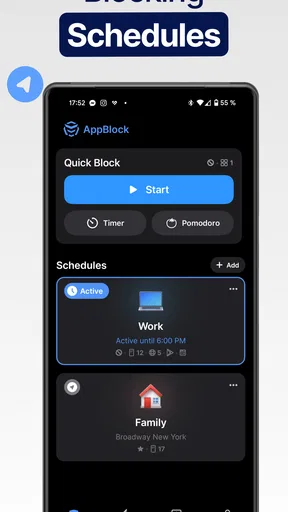
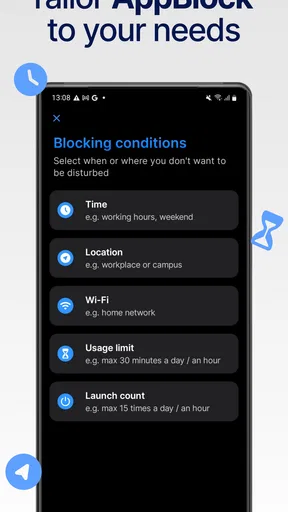
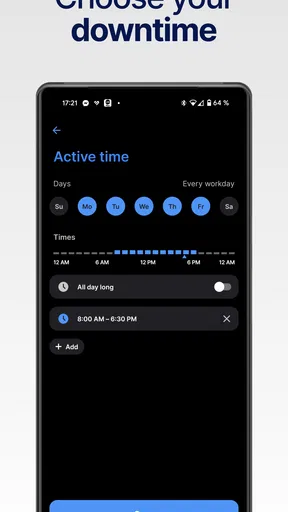
The setup process is straightforward. You can start by selecting the apps and websites you want to block. There’s also an option to schedule blocks at specific times, which is super handy if you’ve got a routine. For instance, I blocked social media during work hours to keep myself from getting sidetracked.
For shared-device use, I would begin with a small, low-risk schedule rather than blocking everything that looks distracting. A short study period or a regular work window is easier to explain and review than a broad rule that unexpectedly prevents someone from using a needed app. Before turning a block on, I’d check whether the device is also used for practical tasks, such as contacting someone or looking up information. That simple check can prevent a focus plan from becoming a household inconvenience.
Profiles are useful, but not a substitute for coordination
One of the standout features for me was the ability to create multiple profiles. This means you can set different blocking rules for different situations. For example, a "Work" profile can block all social media, whereas a "Study" profile might block games and entertainment sites. It’s like having a personal assistant keeping you on track!
In a household, I’d treat those profiles as context presets for one user, not separate accounts for family members. A work profile and a study profile can suit the same person’s changing day; they do not, by themselves, establish who is allowed to change a shared phone’s settings. If two people take turns using one device, it is safer to agree on when a profile is active and who is responsible for switching it than to assume each person’s preferences will remain separate.
A practical routine is to tell other regular users about a planned block before it begins. For example, if I need an uninterrupted study session in the evening, I can let my family know that social apps will be unavailable on my device for that window and make sure they have another way to reach me if needed. This is coordination, not a technical guarantee: the app helps with the chosen limits, while the people sharing the space still need to understand them.
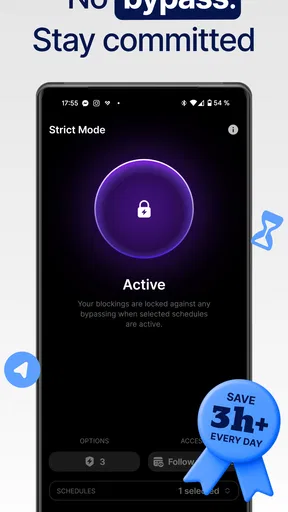
The app also has a "Strict Mode" which, once activated, doesn’t allow you to turn off the blocks until the set time expires. This is perfect for those of us who might be tempted to cheat. Trust me, it’s a game-changer when you have deadlines looming.
That firmness is a trade-off worth considering. It can help when the main obstacle is an impulsive tap to cancel a session, but a rigid block may frustrate someone who has a legitimate reason to use a restricted app. I would reserve it for a time-limited commitment I have thought through, rather than enabling it casually on a device other people rely on. A useful rule is to test an ordinary schedule first and only add stricter friction when I know the schedule is sensible.
Choose rules around real routines
A realistic example is a student who tends to open social media while working at the kitchen table. I’d set a study profile for the agreed study period, keep the block focused on the usual distractions, and tell anyone else who uses the phone when the restriction will end. If the student needs the device for a school task, the block should not be so sweeping that it interrupts that task. The point is to remove a habitual detour, not to make the phone unusable.
For a parent or caregiver, I would be careful not to treat an app blocker as a substitute for a conversation about age-appropriate phone use. The Everyone rating describes the content rating, not a family-control feature. A young person should understand what is being restricted and why, especially if the phone is theirs. For a younger child using an adult’s device, the adult should set expectations directly and remain responsible for what the child can access; a productivity blocker is not the same thing as dedicated parental supervision.
Using AppBlock has been a bit of a revelation. It’s amazing how much you can accomplish when distractions are minimized. I’ve been more productive at work, and my study sessions are more focused. It’s not just about blocking apps; it’s about creating a healthier digital environment.
One useful way to judge whether a rule is working is to notice what happens during the blocked time, not merely whether the distracting app stayed closed. If I keep picking up my phone to look for something else, the restriction may be aimed at the wrong habit. If I settle into the task more easily, the boundary is doing its job. I would adjust the target list or schedule based on that experience rather than piling on more restrictions automatically.
Where it fits among other approaches
Compared with simply relying on willpower, an app blocker adds a deliberate pause between an urge and the distracting app or site. Compared with a device’s built-in screen-time settings, it is an option for people who want a dedicated productivity tool with profiles and blocking schedules. The best choice depends on what the household needs: if the goal is to help one adult or student stay on task, a focused blocker may be a better fit; if the goal is to manage a child’s device use or coordinate separate family accounts, a purpose-built parental or family-management solution is more appropriate.
There is also a low-tech alternative: put the phone out of reach, agree on a shared quiet period, or use a separate device for the task. Those approaches require no app setup and can work better when several people need the same phone. AppBlock is most useful when the device remains nearby and the temptation is specifically to open selected apps or websites. It is less helpful if the distraction is conversation, another device, or a task that keeps pulling you online for legitimate reasons.
I found AppBlock to be pretty reliable in terms of performance. The app runs smoothly in the background without draining my phone’s battery, which is always a plus. The notifications are subtle, reminding you that certain apps are blocked without being intrusive.
One thing I noticed is that it works best when you’ve got a stable internet connection. Occasionally, the app took a moment to sync changes when I was on a patchy network. But other than that, it did its job impeccably.
Those observations make me cautious about relying on any blocker as the only plan for a critical deadline. If a setting takes a moment to reflect, I would not build an important household arrangement around the assumption that every change is immediate. I’d configure the routine ahead of time, check that it is active, and keep an alternative way to handle urgent communication. That is a sensible habit for a focus tool, especially when a shared device has practical uses beyond entertainment.
Who should use it, and who should look elsewhere
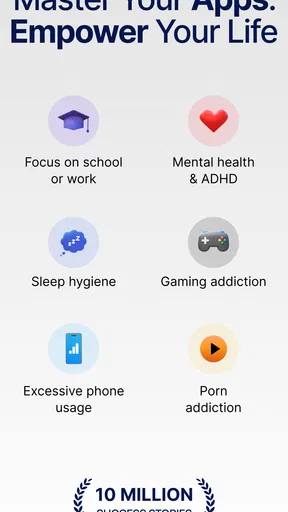
Using the app is most appealing if I already know which apps derail me and want a repeatable way to make those moments less tempting. A student with predictable study periods, a remote worker who checks social feeds by reflex, or someone trying to create phone-free blocks in the evening can all get value from that kind of structure. The flexibility of different profiles is particularly useful when one person has distinct work and leisure routines.
I would skip it if I want a system that automatically coordinates several household members, enforces family rules across separate accounts, or replaces supervision for a child. I would also avoid strict blocks on a shared device unless everyone understands their effect. If my distractions are mostly notifications from essential communication or work tools, a broad block may be the wrong answer; adjusting notifications or changing where I work could be less disruptive.
The app is free to download, with in-app purchases ranging from $0.99 to $119.99 per item. I’d try the basic approach first and decide whether it solves a real problem before paying for anything. It is also worth checking that the version is compatible with the device: the current version is 7.15.2, and the listed minimum operating-system requirement is version 9. For a household with older devices, that compatibility check is more useful than assuming every phone or tablet can run it.
My household verdict
However, like any tool, its effectiveness depends on how you use it. If you’re committed to improving your productivity, this app can be a valuable ally. But if you keep finding loopholes, well, then it’s back to the drawing board.
Overall, AppBlock - Block Apps & Sites is a fantastic tool for anyone looking to increase their productivity by reducing digital distractions. The app’s flexibility, combined with a user-friendly interface, makes it a must-try. Whether you’re a student, a professional, or just someone trying to cut down on screen time, this app has something to offer.
So, if you’re ready to take control of your digital habits, give AppBlock a shot. You might just find it’s the productivity booster you’ve been searching for. And hey, who doesn’t want to finish work early and have more time for life’s other joys?
My recommendation is strongest for one person setting boundaries on their own device and then following through with a routine. In a household, that can still be valuable, as long as everyone treats the blocks as that person’s focus plan rather than an invisible rule imposed on everyone else. Start with a clear purpose, choose a manageable schedule, and talk through any shared-device consequences first. If what you really need is family-wide oversight or separate controls for different users, I’d choose a tool built for that job instead.
Verdict
Strengths of AppBlock - Block Apps & Sites
- Customizable blocking schedules.
- User-friendly interface.
- Helps improve productivity.
- Blocks notifications effectively.
- Supports multiple devices.
Limitations of AppBlock - Block Apps & Sites
- Limited free features.
- Occasional app crashes.
- Subscription required for full access.
- Complex for new users.
- Can drain battery quickly.
Similar Picks in This Category
View All
Google Calendar
Google LLC4.6

Google Drive
Google LLC4.3

Google Assistant
Google LLC3.9

Microsoft OneDrive
Microsoft Corporation4.6

Samsung Calendar
Samsung Electronics Co., Ltd.4.1

Microsoft OneNote: Save Notes
Microsoft Corporation4.6
Frequently Asked Questions
What is AppBlock and how does it work?
AppBlock is a productivity app designed to help you manage your time by blocking distracting apps and websites. Once installed, you can set up profiles with specific rules, such as blocking social media during work hours. The app will automatically restrict access based on your preferences, helping you focus on important tasks.
Can I customize the blocking schedules in AppBlock?
Yes, AppBlock allows full customization of blocking schedules. You can create multiple profiles with different rules, specifying which apps or websites to block and during what hours. This flexibility means you can tailor the app to fit your daily routines, ensuring maximum productivity and minimal distractions.
Is AppBlock free to use, or are there in-app purchases?
AppBlock offers a free version with essential features to block apps and websites. However, there are in-app purchases available that unlock premium features, such as creating unlimited profiles, accessing detailed usage statistics, and setting password protection to prevent unauthorized changes to your blocking rules.
Will AppBlock drain my device's battery?
AppBlock is designed to run efficiently in the background without significantly draining your device's battery. It uses minimal resources to monitor and enforce your blocking rules. However, as with any app running continuously, a slight impact on battery life is possible, but it is generally negligible.
How does AppBlock ensure my privacy and data security?
AppBlock is committed to protecting user privacy and data security. The app does not collect personal data or track your app usage. All settings and data are stored locally on your device, ensuring that your information remains private and secure. Always review the app's privacy policy for detailed information.
